

Configuration
Configure Call Transfer Destinations for Your Facility
Set up the desks and teams your AI agent can route callers to, including display names, phone numbers, routing responsibilities, and transfer messages.
Call transfers let your AI agent hand a caller off to the right desk or team the moment a request falls outside what the agent can resolve on its own. Configuring destinations clearly is the single most effective way to ensure callers reach the correct person without being bounced between departments.
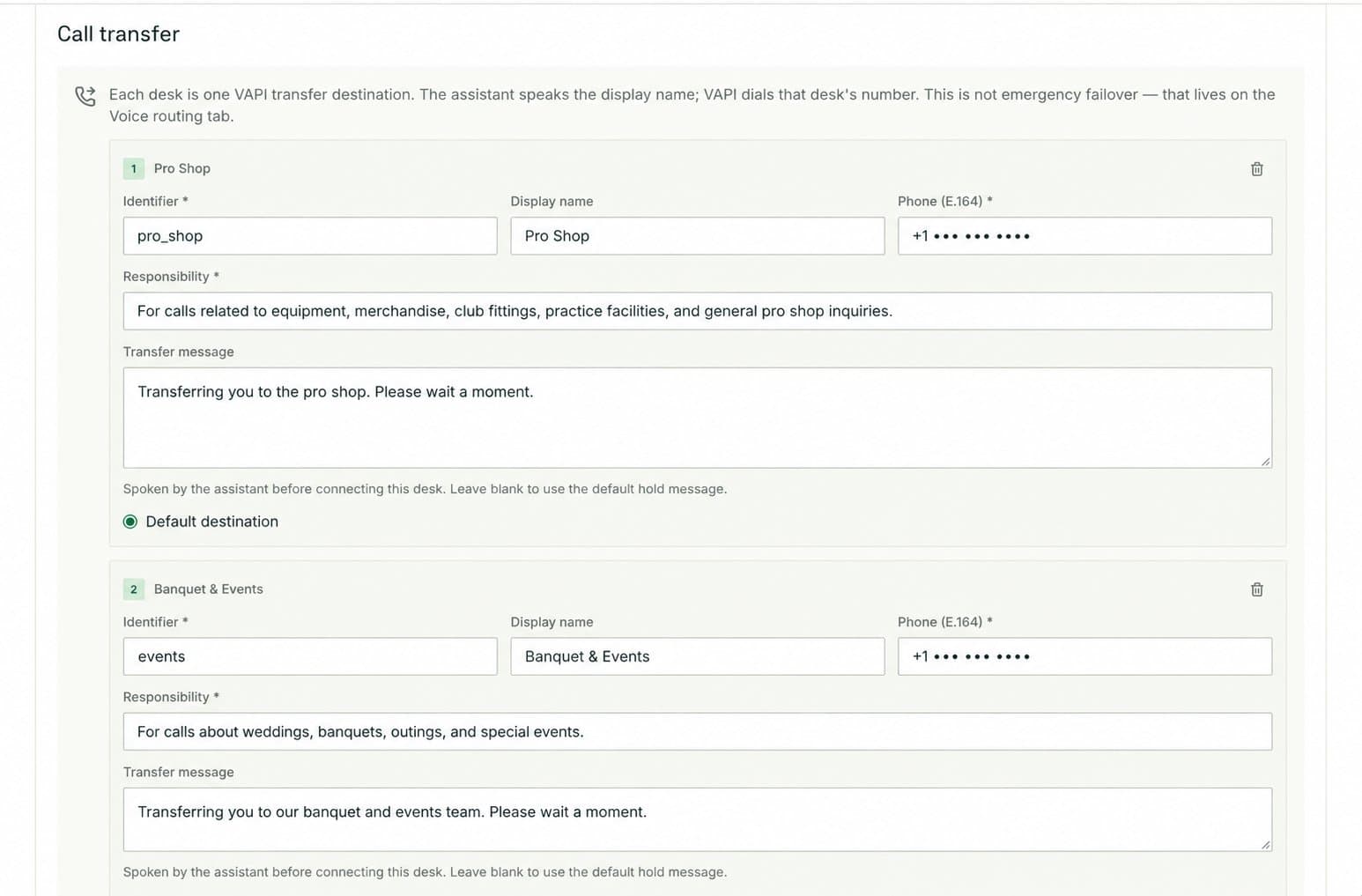
Open the Call transfer tab
Navigate to Facilities, select your facility, and open the Call transfer tab. From here you can view existing destinations and add new ones.
Add a destination
Select Add destination to create a new transfer target. You can add as many destinations as your facility needs — there is no hard limit. Fill in each field described below before saving.
Destination fields
| Field | Description |
|---|---|
| Identifier | A unique internal label used by the system to reference this destination. It is not spoken aloud. Use something short and descriptive, such as pro-shop or golf-ops. |
| Display name | The name the caller hears when the agent announces the transfer, for example "our Pro Shop team" or "the Golf Operations desk." |
| Phone number | The direct dial number the agent calls when transferring. Double-check this number before saving — a wrong digit sends callers to the wrong place. |
| Responsibility | A plain-language description of the questions and requests this destination handles. The agent reads this description to decide whether to route a caller here. |
| Transfer message | The message played to the caller immediately before the transfer connects. Use it to set expectations, for example: "Let me connect you with our Pro Shop — please hold for just a moment." |
| Default destination | Toggle this on for the destination that should receive any call the agent cannot confidently route elsewhere. Only one destination should be marked as the default. |
Writing effective responsibilities
The responsibility field is the primary signal the agent uses to make routing decisions. Write it as a clear routing rule rather than a vague job title.
Phrase responsibilities as explicit lists of topics, for example: "Use this destination for equipment, merchandise, club fitting, and practice-facility questions." The more specific you are, the more accurately the agent routes callers.
Avoid giving two destinations overlapping responsibilities unless both teams are genuinely equipped to handle the same type of request. Overlapping rules create ambiguity and can result in inconsistent routing. If two teams share a category, note the distinction clearly in each responsibility — for example, one destination handles "advance tee-time bookings" while another handles "same-day walk-in availability."
Facilities
Manage facility details, plan operating hours for the whole year with seasonal schedules and overrides, and configure booking links and call templates.
Agents
Select your agent's voice, preview it before going live, and control background audio settings to shape the caller's audio experience.