

Call Management
Questions: Explore Recurring Caller Question Themes
Browse clusters of similar caller questions to spot recurring topics, identify knowledge gaps, and decide where your Knowledge Base needs improvement.
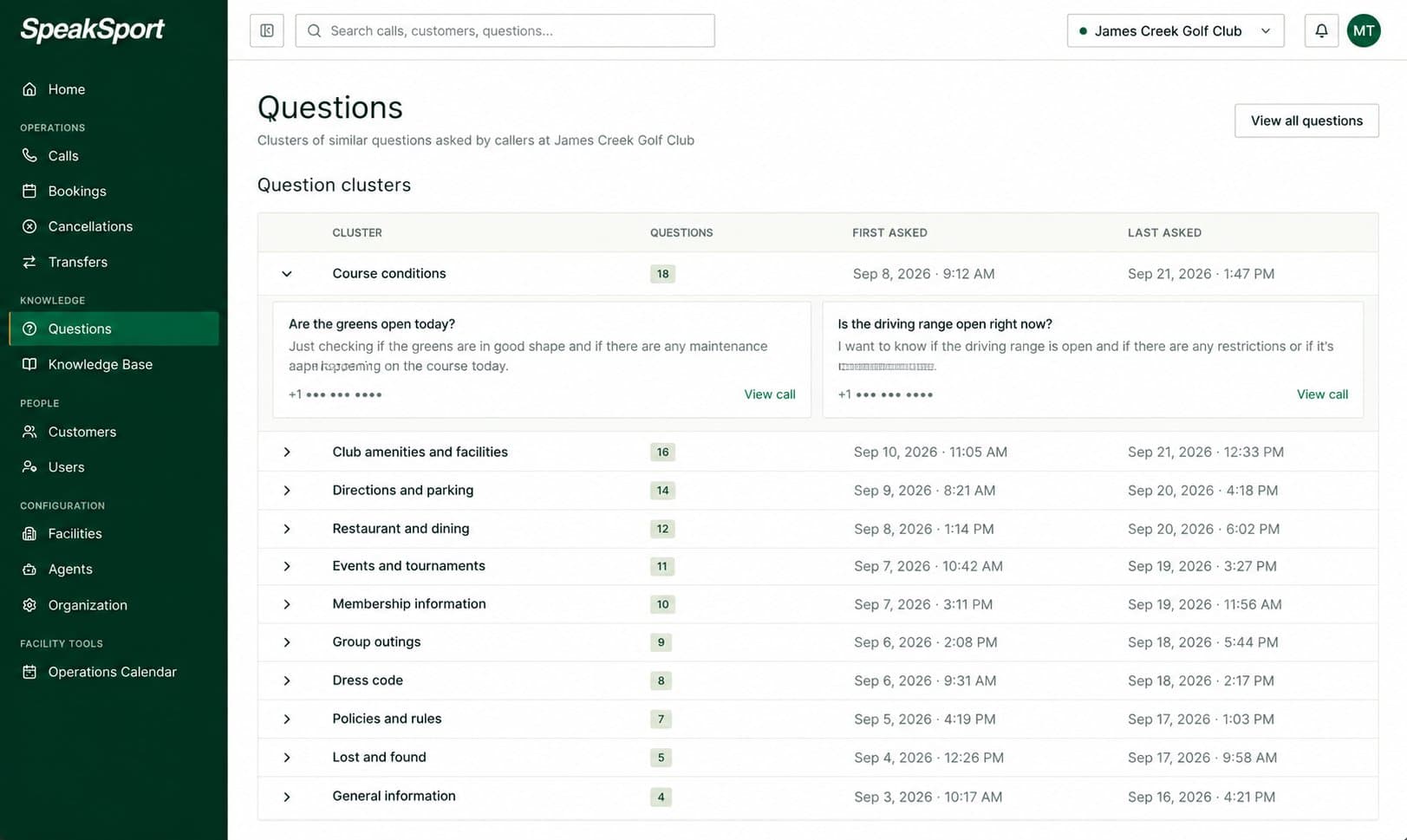
The Questions page groups caller questions into clusters based on shared themes and intent. Rather than listing every individual sentence callers have spoken, it surfaces recurring patterns — clusters of questions that are asking roughly the same thing in different ways. Use this page to understand what callers consistently want to know, then use that insight to improve your Knowledge Base so the agent can answer those questions more accurately and completely.
What a question cluster is
A cluster is a group of questions that share a common theme or intent. Callers rarely phrase the same question identically, but they often ask about the same topic — green fees, cart availability, twilight rates, dress code, and so on. SpeakSport groups those semantically similar questions together so you can see the pattern clearly rather than scrolling through hundreds of individual sentences.
What you see per cluster
Each cluster row displays four pieces of information:
| Field | Description |
|---|---|
| Cluster label | A short label describing the shared theme of the questions in the cluster. |
| Count | The total number of questions grouped into this cluster. |
| First asked | The date the earliest question in this cluster was recorded. |
| Most recently asked | The date the most recent question in this cluster was recorded. |
Review questions in a cluster
Expand any cluster to see a sample of the actual questions callers asked that were grouped into it. These examples give you the exact phrasing callers use, which can help you write clearer answers in your Knowledge Base.
To trace a question back to its original call, select View call next to any example question. The full call record opens so you can read the transcript, listen to the recording, and see what the agent said in response.
Flagged questions the AI could not answer
SpeakSport automatically flags questions where the agent did not have a confident answer during the call, so you can close those gaps proactively instead of hunting for them. Each flagged question appears with the caller's phone number, the agent's response, and a quick action tailored to the type of gap. Select View call to open the full call record, or Dismiss to clear the alert at any time.
Needs answer
Use this when the question is about something consistent that belongs in your Knowledge Base — menu items, pricing, policies, hours, dress code, and other standing facility information.
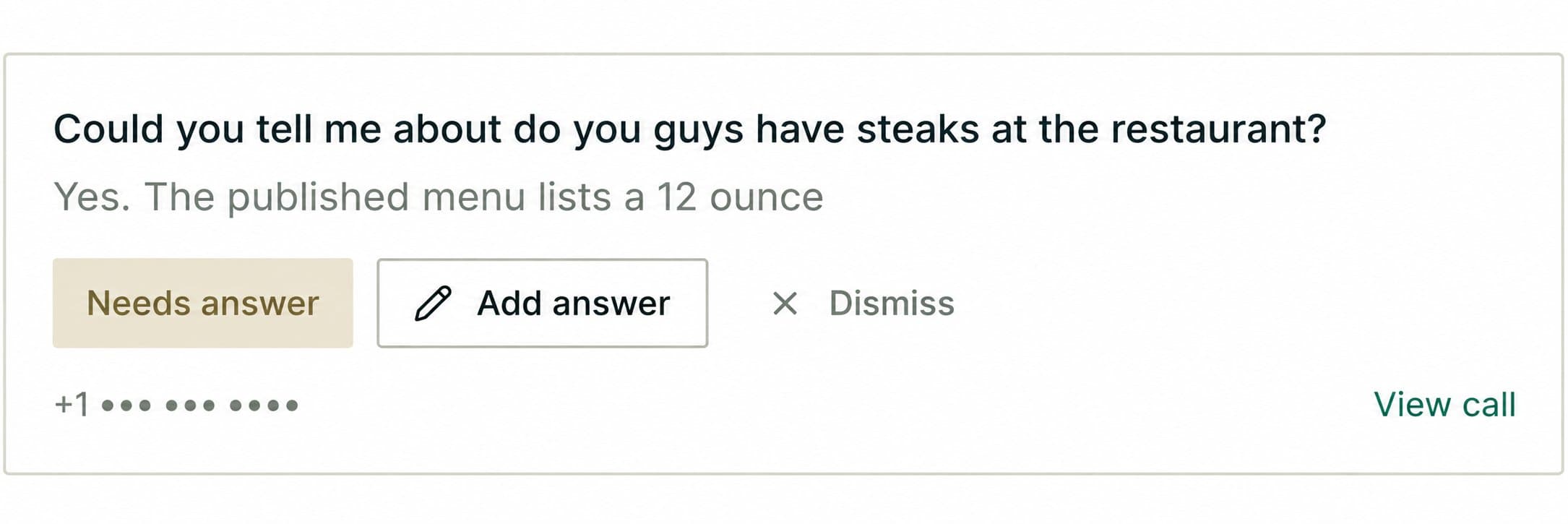
Select Add answer to capture the answer and save it to the Knowledge Base. The agent will use it on the next call that asks the same thing.
Needs event
Use this when the question depends on something time-sensitive — course conditions after weather, temporary closures, maintenance windows, league nights, or short-lived specials.
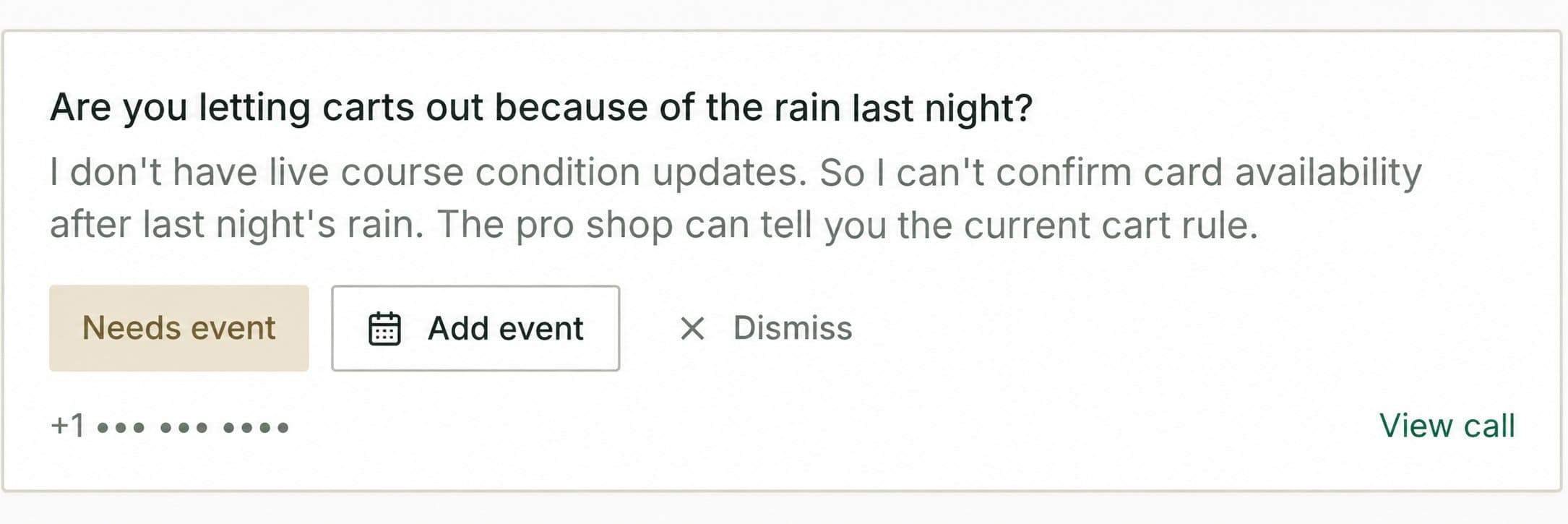
Select Add event to create a time-bounded entry in the Operations Calendar. The agent references the event only during the window you configure and stops using it automatically when the window ends.
Use clusters to improve your Knowledge Base
When you notice a cluster with a high question count or a recent surge in activity, it's a signal that callers are looking for information the agent may not be answering well. Open the cluster, review the example questions, and then visit the Knowledge Base to check whether the relevant information is present, accurate, and clearly written.
Common actions to take based on question clusters:
- Add missing information — If callers are asking about something not yet in the Knowledge Base, add a new entry covering that topic.
- Clarify existing entries — If the information exists but the cluster is still growing, the current wording may not give the agent enough to work with. Expand or rephrase the relevant section.
- Address seasonal topics — If a cluster spikes around a specific event or time of year, consider adding a temporary entry in the Operations Calendar to give the agent timely context.
Transfers
See every call the AI agent transferred to another destination — pro shop, restaurant, events desk, and more — along with the reason for each transfer.
Bookings
View and manage reservations created through SpeakSport calls, including tee times, player details, pricing, and booking status updates.